
Last Updated: October 22, 2026
Quick Summary
To choose a mouse for small hands, measure your hand length from wrist crease to middle fingertip and your width across the knuckles, then match those numbers to a compact shell and adjust for your grip style. Under 16.5 cm calls for a mini or compact mouse roughly 9.5-10.5 cm long and 5.2-5.8 cm wide.
Most mice are built for average and large hands, so a small-handed user ends up reaching, stretching, and gripping harder than they should.
Here is the core problem. A mouse that is too long forces your fingers to extend flat.
At Today’s Wellness Zone, we see this constantly with desk workers who treat hand discomfort as normal. It is not.
Below, we’ll show you exactly how to measure, match, and test a mouse before you spend money. The steps take about ten minutes.
Hand size for a mouse is measured two ways: length from wrist crease to middle fingertip, and width across the knuckles. Those two numbers decide which shell dimensions will actually fit you.
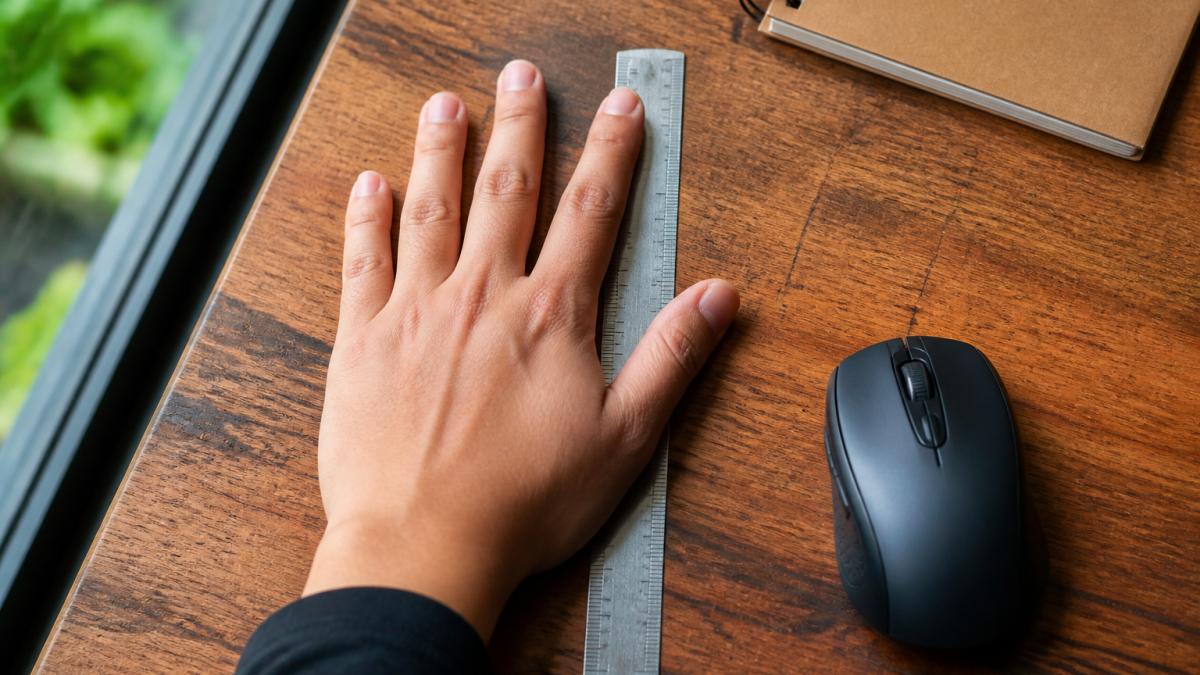
Here is the method we recommend.
Do this twice. Small differences matter when you are comparing shells that sit close together in size.
A common mistake is measuring with the hand curved. Measure flat, then note how you actually hold a mouse.
The right mouse length depends on your hand length and how you hold it. A rough rule: the mouse should let your fingers rest without stretching and your palm settle without hovering. But a single table is not enough, because grip style changes which dimension matters most.
Start with your two measurements, then apply the grip-specific adjustments below.
| Your Hand Length | Mouse Length | Mouse Width | Starting Shell Class |
|---|---|---|---|
| Under 16.5 cm | 9.5-10.5 cm | 5.2-5.8 cm | Mini or compact |
| 16.5-17.5 cm | 10.5-11.5 cm | 5.5-6.0 cm | Small |
| 17.5-18.5 cm | 11.5-12.0 cm | 6.0-6.5 cm | Small-to-medium |
| Over 18.5 cm | 12.0 cm and up | 6.5 cm and up | Standard |
These are starting points, not rules. Grip style shifts the answer, which is why the next three sections split them out.
Palm grip. Your whole hand rests on the shell. Prioritize a mouse length at the low end of your band so your fingertips land on the buttons, not past them.
Claw grip. Your palm lifts and fingers arch. Choose a shell 0.5-1.0 cm shorter than your palm-grip length and with a lower back height so your palm is not pushed up.
Fingertip grip. Only your fingertips contact the mouse.
Your grip span (thumb tip to index fingertip) tells you how much side real estate you can control. As a practical check, the mouse width should be roughly 55-65% of your grip span. If the shell is wider than that, your thumb and ring finger will pinch to hold it; if narrower, your hand will feel cramped and unstable.
For a palm grip, the whole hand rests on the shell and the fingers lie flat.
Look for these traits:
Palm grip is comfortable for long desk sessions because the hand stays relaxed. The trade-off is speed. Palm grip is slower for fast reactions, which matters if you game.
If your palm hangs off the back of a standard mouse, that is your signal to size down.
Claw grip lifts the palm and arches the fingers, so the hand contacts the mouse at the fingertips and the base of the palm. A mouse for small hands claw grip should be short and low at the back.
What to prioritize:
Claw grip gives faster control than palm grip. The cost is more finger tension, so a lighter mouse helps.
A gaming mouse for small hands has to solve one extra problem: button reach. If the side buttons sit too far forward, you have to shift your grip to press them. That shift costs you control mid-game.
Check these before buying:
For wireless, weigh battery life against weight. A heavy battery pack can undo the benefit of a light shell. Wired removes charging entirely.
You can test fit without owning the mouse. Use these checks at a store, or against the published dimensions before ordering. The goal is to confirm four things: finger reach, palm contact, button access, and wrist posture.
Run the list against the product dimensions first. Then confirm in person if you can.
Most electronics retailers display mice on a tethered stand. Use that tether to your advantage:
Online orders are where fit actually matters, because you test at your own desk. Before you commit:
For left-handed users, look for a true left-handed shell or a symmetric design with buttons on both sides. Many “ambidextrous” mice only put side buttons on the left, which leaves left-handed users reaching. Check the button layout in the product photos, not just the label.
If you have run the checks and the mouse still causes discomfort, the issue may be desk setup rather than the shell. Wrist posture, desk height, and chair position all affect how your hand meets the mouse. Adjust those before buying another mouse, and if discomfort persists, consult a qualified professional rather than self-diagnosing.
Hand discomfort at your desk is a fit problem, not a personal failing. Measure your hand, match the shell to your grip, and run the fit checks before you buy.
At Today’s Wellness Zone, we stock carefully curated recovery and ergonomic gear, all 100% original and covered by vendor warranty. Every order ships direct to your door, and our 30-day return policy lets you test fit without risk. Start shopping and build a desk setup that stops fighting your hands.
Yes. A hand length of about 17 cm (roughly 6.7 inches) falls in the small range, which is common among many women and some men. At that length, most full-size mice force your fingers to stretch or your palm to float. Look for compact shells around 10 to 11.5 cm long, 5.5 to 6 cm wide, and under 40 mm tall. Measure from the tip of your middle finger to the base of your palm, then compare that number to the mouse’s listed dimensions before ordering.
Three signals show up fast. First, your fingers can’t reach the front buttons without shifting your whole hand. Second, your palm rests on the back edge instead of the middle, so you grip with your fingertips only. Third, your wrist bends upward to reach the scroll wheel. Any of these means the shell is oversized. A quick test: place your hand on the mouse and check whether your index finger sits comfortably on the left button with a slight bend, not stretched straight.
Fingertip and claw grips usually suit small hands best because they need less shell length. Palm grip works too, but only with a compact mouse that has a raised back and short front so your palm stays supported without overreaching. Try each grip for a few minutes with a demo unit if you can. The right grip is the one where your wrist stays neutral and your fingers reach every button without strain.
Lighter is usually easier for small hands because you move less mass with each flick. Many compact gaming mice sit under 70 grams, and some drop below 60. That said, weight is personal: a very light shell can feel twitchy if you prefer steady aim. Look for a mouse in the 55 to 75 gram range, then adjust DPI and sensitivity in software to match your control preference. Wireless models add freedom but check battery life and latency specs first.